
User-friendly GIS viewer for every application
View maps, analyze data, and easily collaborate with colleagues. GeoApps Viewer is a powerful, web-based GIS solution that transforms complex spatial information into clear insights.
Get a Demo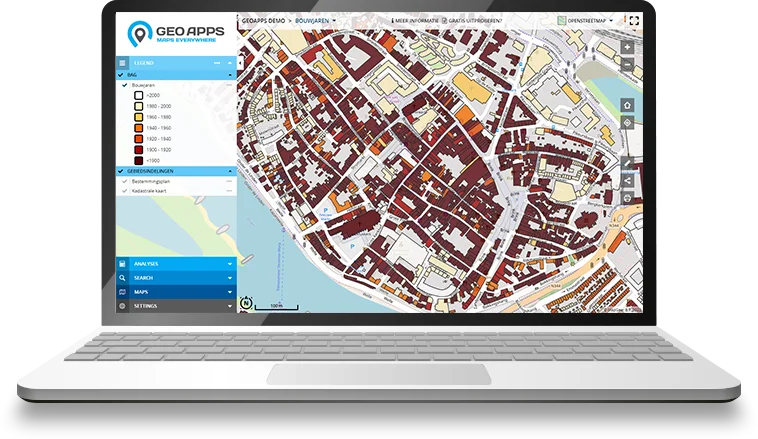
Trusted by 300+ organizations worldwide
From municipalities and provinces to international companies – GeoApps Viewer is the reliable choice for viewing and sharing spatial data.
















Why Choose GeoApps Viewer?
Transform your spatial data into interactive maps with professional-grade tools designed for clarity and impact
Better Decisions
Transform complex data into clear, actionable insights that drive informed decision-making across your organization.
Real-time Insights
Stay ahead with instant access to critical spatial data and live updates, enabling quick responses to changing situations.
Enhanced Collaboration
Break down silos with seamless data sharing and collaborative tools that keep your entire team aligned and efficient.
Quick Start Guide
Get started with GeoApps Viewer in three simple steps and discover how easy it is to create powerful, interactive maps
Create Your Map
Create your first online map viewer quickly and easily with GeoApps Viewer. Choose from standard color templates and style libraries, or customize with your own colors and icons. Set up user permissions to control who can view and edit your maps.

Drawing & Management
Take full control of your map data with GeoApps' comprehensive management tools. Benefit from enterprise-grade features like two-factor authentication and Active Directory integration. Perfect for larger organizations requiring secure, professional data handling.

Analysis Tool
Transform your data into actionable insights with GeoApps' powerful analysis tools. Create comprehensive reports for policy making, market research, or performance monitoring. Get instant results and export professional PDF reports in your corporate style.
Curious about the possibilities?
View the interactive GeoApps Viewer here and discover the many, simple usage options.
Advanced Visualization Options
Explore your spatial data from every angle with our cutting-edge visualization technologies.

3D Visualization
Explore your spatial data in stunning three dimensions with realistic rendering, elevation models, and immersive navigation controls.

Oblique Imagery
View high-resolution aerial imagery from multiple angles for comprehensive site analysis and better understanding of your projects.

Street View Integration
Seamlessly navigate between map view and street-level imagery for ground-truth verification and detailed site inspection.

Real-time Updates
Monitor your spatial data in real-time with automatic updates and live tracking. Stay informed of critical changes as they happen.
What our customers say
Discover why organizations trust GeoApps for their spatial challenges.
Regio Foodvalley
"User-friendliness was most important. With GeoApps, we enter new projects ourselves and update data without problems."
Dennis Gudden, Project Manager Business Desk
Key Features
Comprehensive GIS viewer with powerful features for every application
Interactive Maps
Create responsive maps that engage users with smooth interactions
Data Connections
Connect and synchronize different data sources to keep your information always up-to-date
Flexible Styling
Customize the design to match your corporate identity and specific requirements
Excellent Performance
Experience a fast and stable map viewer - even with large datasets and complex visualizations
Advanced Analysis
Discover trends, patterns and relationships with powerful spatial data analysis tools
Team-oriented Map Management
Collaborate on maps with multiple users. Perfect for data collection, process-oriented work and real-time overview
Easy Sharing
Make your maps and insights easily available to team members, partners and external stakeholders
Extensive Reports
Generate data-driven reports based on geodata - from monitoring to opportunity analysis. Export easily in multiple formats
Advanced Visualization
Explore your data in 3D, with oblique imagery and street view integration for comprehensive spatial understanding
Ready to create your own interactive maps?
Join thousands of professionals who are already converting their data into valuable insights with GeoApps.

Frequently Asked Questions about Viewer
Find answers to common questions about GeoApps Viewer.