Alle Funktionen von GeoApps
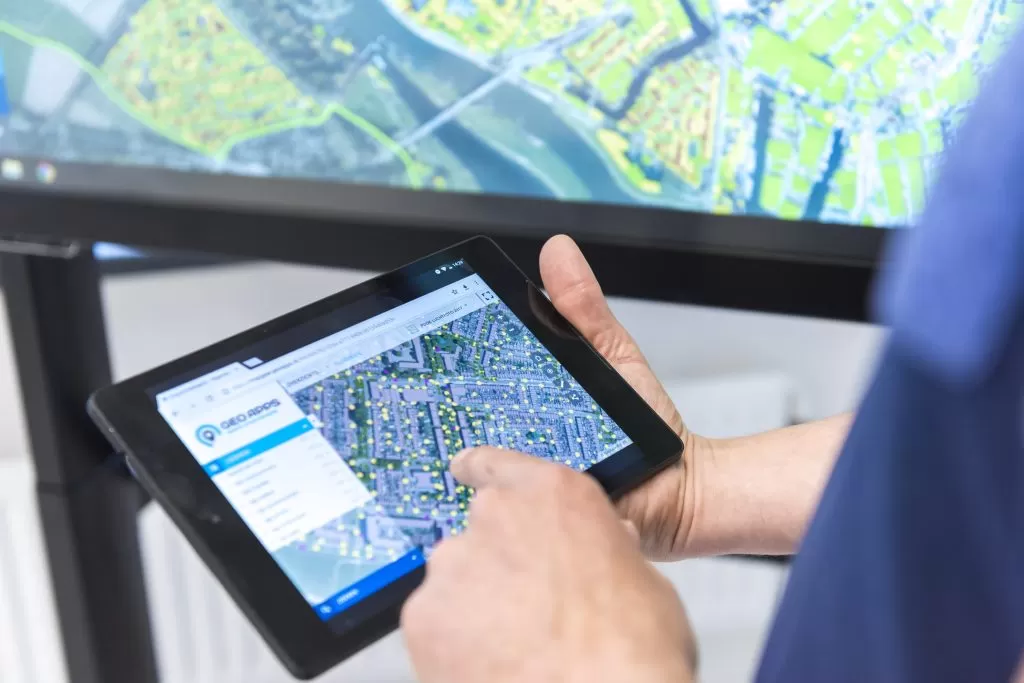
Entdecken Sie, was in GeoApps enthalten ist: Kartenfunktionen, Apps, Bearbeitung & Analyse, Visualisierung, Benutzerrollen und professioneller Support. Sehen Sie unten den vollständigen Vergleich pro Abonnement.
Für den vollständigen Vergleich pro Abonnement siehe unsere Funktionsmatrix.
* = Als Add-on erhältlich
| Funktion | Erklärung | Verfügbar ab Abonnement? |
|---|---|---|
General(4) | ||
| Projects | Organize apps, map layers, and datasets within separate projects to enable reuse and structured configuration. | Alle |
| Folders | Use folders within projects to structure and organize apps, map layers, and datasets. | Alle |
| Recycle Bin | Deleted configuration items are stored in the recycle bin for 30 days and can be restored. | Alle |
| Multi-language | GeoApps fully supports multiple languages, automatically selected based on the user profile. | Alle |
Apps(8) | ||
| Viewer | Configurable, interactive map viewer for publishing spatial data and maps. Designed to explore, search, and interact with geographic information. Includes an intuitive Editor to build and style the viewer. | Alle |
| Dashboard | Interactive, data-driven dashboard combining maps, charts, and widgets, with an integrated Editor for easy dashboard creation. | Alle |
| MapTour | Narrative map application for telling stories with geographic data. Lets you guide viewers through locations and content in a structured, step-based experience. Can be configured with an easy Editor. | Alle |
| Widget | Modular component builder for creating interactive map elements that can be embedded into your website or application. | Alle |
| PraatMee | Interactive participation tool that allows users (e.g., citizens) to engage with plans and spatial ideas on a map by commenting, reacting, or submitting input. Comes with a simple configuration editor. | Add-on* |
| Fieldwork (GPS) | Mobile field data collection app that supports GPS capture and integration with external GPS receivers. Designed for accurate data capture in the field. | Add-on* |
| Custom Apps | Develop custom map applications using GeoApps building blocks, a dedicated developer portal, and the GeoApps UI framework. Custom apps integrate directly with the GeoApps REST API for full access to maps, data, and configuration. | Add-on* |
| GeoApps store | Online store for all GeoApps apps, blocks, and extensions, enabling fast deployment and easy update management within your GeoApps environment. | Alle |
Branding(6) | ||
| Logo and Accent colors | Apply your own logo and accent colors to your GeoApps applications. | Alle |
| Own subdomain | Use your own dedicated subdomain (e.g. kaarten.deventer.nl). | Ab Business* |
| Multiple brandings | Apply different branding configurations to different apps or projects. | Ab Business |
| Themes | Define branding as reusable themes and apply them across multiple apps or maps. | Add-on* |
| White-label | Fully white-label GeoApps using custom UI styling and domains, with no visible GeoApps branding. | - |
| Custom domain | Use a fully custom domain to white-label GeoApps (e.g. maps.<customername>.nl). | - |
Data Management(22) | ||
| Dataset Upload | Import datasets from the following file types: Shapefile, Excel (basic), CSV, GeoJSON, GeoPackage, DXF, GeoTIFF, ECW. | Alle |
| Shapefile | Import Shapefiles as datasets. | Alle |
| Excel (basic) | Import Excel files as datasets. | Alle |
| CSV | Import CSV files as datasets. | Alle |
| GeoJSON | Import GeoJSON files as datasets. | Alle |
| GeoPackage | Import GeoPackage files as datasets. | Alle |
| DXF | Import DXF files as datasets. | Alle |
| GeoTIFF | Import GeoTIFF raster data. | Alle |
| ECW | Import ECW raster data (ortho photo). | Add-on* |
| Dataset Update | Replace or update existing vector datasets with new versions of the same data. | Alle |
| Dataset Download | Export datasets from GeoApps in supported formats. | Alle |
| Multi-geom datasets | Make use of multi-geometry in datasets. | Alle |
| Webservices support | Load layers from the following (OGC) Services: WMS, WMTS, WFS, TMS, GeoJSON. | Alle |
| WMS | Web Mapping Service (1.1.0 and 1.3.0). | Alle |
| WMTS | Web Mapping Tile Service (1.0.0). | Alle |
| WFS | Web Feature Service (1.1.0 and 2.0.0). | Alle |
| TMS | Tile Mapping Service. | Alle |
| GeoJSON (external) | Externally hosted GeoJSON files. | Alle |
| Domain Lists | Configure domain lists or lookup tables to define allowed values for dataset attributes. | Alle |
| Coordinate systems | Work with data in multiple coordinate systems simultaneously. | Alle |
| Metadata | Define and manage metadata at dataset level or for a subset of attributes. | Alle |
| QGIS plugin | Seamlessly load data from GeoApps into QGIS or upload data from QGIS directly to GeoApps projects and datasets. | Alle |
Advanced Data Management(5) | ||
| Dataset Joins (1:1) | Extend datasets by joining additional attributes from other datasets using one-to-one relationships. | Ab Enterprise* |
| Dataset Joins (1:N) | Link datasets using one-to-many relationships to enable related data interaction in the Viewer or Dashboard. | Alle |
| Dynamic attributes | Define calculated attribute values based on time such as ages or based on geometry such as an outline, surface or coordinates/centroids. | Alle |
| SQL-based attributes | Define computed attribute values using SQL expressions, calculated on the fly based on other columns. | Ab Enterprise* |
| Linked domain lists | Configure domain lists based on other datasets and reuse them across multiple datasets. | Ab Enterprise* |
Statistics(3) | ||
| Statistics (Data & Layers) | View statistics on layer usage and data requests over time. | Alle |
| Advanced statistics | Gain insight into app and screen usage over configurable time periods, directly within the app editor. | Ab Enterprise* |
| Dataset based bookmarks | Turn dataset attributes into geometry & names of favorite/saved locations. | Add-on* |
Layer Visualization(8) | ||
| Symbology | Style layers using common classification methods: single symbol, categories/unique, graduated/ranges. | Alle |
| Scale dependency | Display layers based on specified map scale levels. | Alle |
| Clustering | Combine large numbers of point objects into clusters, displayed as combined icons with counts. | Alle |
| Labeling | Display text labels for map objects based on attribute values. | Alle |
| Definition queries | Create derived layers by applying predefined attribute filters to a source layer. | Ab Business* |
| Import SLD | Import SLD files (e.g. created in QGIS) to visualize map layers. | Ab Business* |
| Custom SLD | Create and apply custom SLD files to layers, supporting the full SLD specification. | Ab Business* |
| Export SLD | Export configured layer symbology to an SLD file. | Ab Business* |
Advanced Symbology(1) | ||
| Advanced Symbology | Configure advanced layer styling based on multiple attributes. Incl. custom icons, icon library, related filters. | Ab Enterprise* |
Popups(3) | ||
| Popups | Configure popups that appear when a user clicks on an object on the map. Table, text, split, image, list. | Alle |
| Advanced popups | Configure advanced, layer-based popups with extended content options: HTML, embed, actions. | Ab Business* |
| Actions | Add action buttons in the popup, with a link based on one or more properties of the object. | Ab Business* |
Interactive Maps (Viewers)(13) | ||
| Interactive legend | An intuitive legend with interactive layer groups, interactive filtering, and layer-specific options. | Alle |
| Layer Groups | Group layers into structured, interactive sets with group-level visibility controls and descriptive information. | Alle |
| Base layers | Provide the end-user one or multiple base layers, with easy interaction. | Alle |
| Theme Maps | Configure multiple thememaps within a single map for better structure or grouping of data. | Ab Business |
| Transparency | Modify interactively the transparency of layers by the end-user. | Alle |
| Resizing | Interactively adjust the size of point icons in the map using a slider. | Alle |
| Heatmap | Display point vector data as a heatmap. | Ab Business |
| Clustering (display) | Display point vector data as clusters in the viewer. | Ab Business |
| Mask | Configure a vector-based map mask to visually define the area of interest, with options for transparency and inverted masking. | Ab Business |
| Location search | Search in the map with multiple possible methods: web providers, coordinate search. | Alle |
| Location pointer | Request a location's address and coordinates by just right-clicking on the map. | Alle |
| GPS Location | Enable your current location on the map (for mobile field inspections). | Alle |
| On-the-fly reprojection | Reproject data from multiple coordinate systems on the fly within the same visualization. | Alle |
Insight and information(9) | ||
| Attribute table | View and interact with a layer's attribute data, including filtering, sorting, and map zooming. | Alle |
| Custom data search | Search your data using tailor-made search inputs. | Alle |
| Information overlay | Add explaining text or imagery in an information window, which can optionally be shown on page load. | Alle |
| Standard datacatalog | Browse a categorized data catalog and add datasets to the map as temporary layers. | Alle |
| Organization/custom datacatalog | Make your own data catalog. | Ab Business |
| Favorites | Save map views, including extent and visible layers, as personal favorites and quickly zoom to them. | Ab Business |
| Advanced Favorites | Share saved map views with selected user groups or everyone within the GeoApps environment, including any associated sketch layers. | Ab Enterprise |
| Measurement tools | Provide interactive measurements on the map, measure lines, areas, circles and heights (in 3D). | Alle |
| Dimensions | Show dimensions of an object in the map using pop-up information tab (Maatvoering). | Alle |
Filtering and selection(3) | ||
| Interactive filters | Let the user filter the layer based on all or a subset of attributes. | Ab Business |
| Geographic filters | Let the user filter the layer based on filters from an area that is drawn or selected on the map. | Ab Business |
| Advanced selection | Create complex selections based on attributes, geometry, and relationships between layers. | Ab Business |
Export and sharing(4) | ||
| Print the map as pdf, exactly at scale. | Alle | |
| Screenshot | Take a high-resolution screenshot of the map, exporting as JPG file. | Alle |
| Export data (in Viewer) | Export the data of layers through the map (if enabled and allowed). | Ab Business |
| Share | Share the map easily by just creating a link, which preserves location, active layers and filters. | Alle |
3D(4) | ||
| 3D View | Switch seamlessly between 2D and 3D in the viewer. | Alle |
| 3D Photorealistic data | Add 3D data as photorealistic tiles. | Ab Business |
| 3D Vector data | Add 3D data as vector data (OGC3DTiles, CityJSON). | Ab Business |
| 3D Underground | Add and display 3D underground data like cables and pipelines. | Ab Business |
Time & animation(2) | ||
| Timeslider | Interactively filter data based on date and time attributes using a slider. | Ab Business |
| Animations | Combine multiple layers into a time-based series and play them as an animation. | Ab Business |
Drawing & editing(14) | ||
| Drawing & editing | Create, draw, and edit objects directly in the map with configurable forms and role-based permissions. | Alle |
| Add objects | Draw new objects and assign properties. | Alle |
| Update objects | Edit geometry and/or properties. | Alle |
| Delete objects | Remove objects from the map. | Alle |
| Advanced drawing & editing | Support advanced map-based editing operations for spatial features. | Ab Business* |
| Copy features | Copy features between layers. | Ab Business* |
| Split features | Split geometries of existing features. | Ab Business* |
| Drawing Assistant | Provide precision drawing assistance through a toolbar, with controls for segment length, angle, and snapping. | Ab Business* |
| Show distances when drawing | Show distances when drawing. | Ab Business* |
| Snapping | Snap to features or grid when drawing. | Ab Business* |
| Sketch layer | Mark up the map with sketches and notes that can be shared with colleagues. | Alle |
| Mail notifications | Receive automated email notifications for map edits, configurable per action and attribute. | Ab Business* |
| Smart Forms | Configure advanced custom forms with conditional fields based on user input. | Ab Business* |
| Conditional visibility | Use custom forms with conditional fields based on user input. | Ab Business* |
Analyses(1) | ||
| Spatial analyses in Viewer | Run spatial analyses in the viewer (e.g. buffer, overlay, zonal statistics). | Ab Business* |
Reusability in Maps(4) | ||
| Symbology templates | Create symbology as template and reuse it across multiple layers. | Ab Enterprise* |
| Collections | Combine multiple layers into reusable collections that can be easily applied across different maps. | Ab Enterprise* |
| Copy | Copy maps, layers, datasets, and symbology within a GeoApps environment. | Ab Enterprise* |
| Export | Export maps, layers or datasets between multiple GeoApps environments. | Add-on* |
Specialist extensions(1) | ||
| Multi-story floorplans | Multi-story floorplans (Bouwlagen extensie). | Add-on* |
Data Portal(3) | ||
| Service publication - WMS | Allow publication of WMS services through GeoApps. | Alle |
| Service publication - WFS | Allow publication of WFS services through GeoApps. | Ab Business |
| Anonymous/public | Allow public/anonymous services of WMS/WFS. | Ab Business* |
Security(6) | ||
| Public Apps | Allow maps and apps to be public. | Ab Business* |
| Private Apps | Allow maps and apps to be private (behind a login). | Alle |
| User levels (RBAC) | User levels, e.g. Admin, Billing Manager, etc. | Alle |
| App security | Allow security per app or map. | Alle |
| User groups | Structure users within groups and assign permissions per group. | Ab Business |
| Import Users | Import Users with CSV. | Ab Business |
Advanced security(7) | ||
| Activity log & Audit log | Get insights in your GeoApps environment with detailed audit log and activity logging. | Ab Business |
| MFA requirement | Force MFA for all users. | Ab Business |
| IP Whitelisting | Only allow access over specified IPs (e.g. in corporate VPN scenarios). | Ab Enterprise |
| Thememap security | Allow security per thememap. | Ab Enterprise |
| Single Sign On | Allow users to log in with Microsoft Entra Id. | Ab Enterprise* |
| GDPR Logging | GDPR compliant logging of requests on user data. | Alle |
| Row-level security | Configure security settings per dataset row. | Ab Business |
Staged environments(1) | ||
| Additional tenant | Additional environment for dev-, test- or staging purposes. | Add-on* |
Aerial imagery hosting(0) | ||
Benötigen Sie Hilfe bei der Wahl des richtigen Plans?
Unser Team steht bereit, Ihnen bei der Suche nach der perfekten Lösung für Ihre Organisation zu helfen.